
An accelerometer helps a phone detect its tilt. When the device is held still, its readings can indicate which side points down. Software can then rotate the picture, provided the app and settings allow it.
The cover is an illustration. The diagrams show a simplified model; sensor parts and their movements are not drawn to scale.
A tiny mass inside
Many accelerometers contain a tiny mass on a flexible suspension. Electronics detect its displacement relative to the casing. This produces readings for different directions.
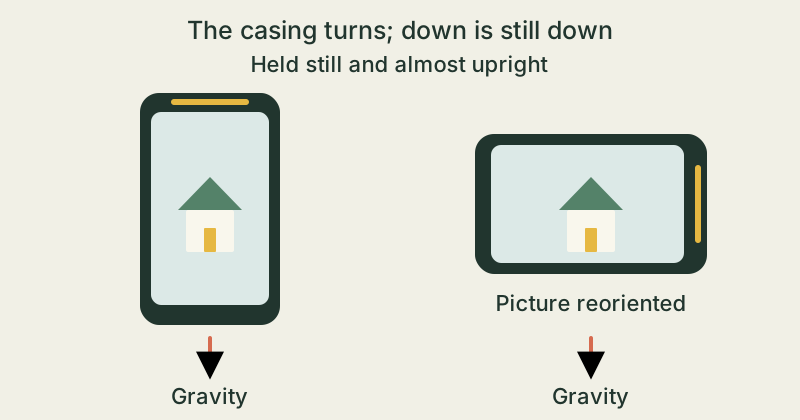
Holding still gives a clue too
A sensor supported in your hand gives a signal even without visible movement. Gravity contributes to this signal. As you slowly turn the phone, the components along its directions change. These help distinguish portrait from landscape.
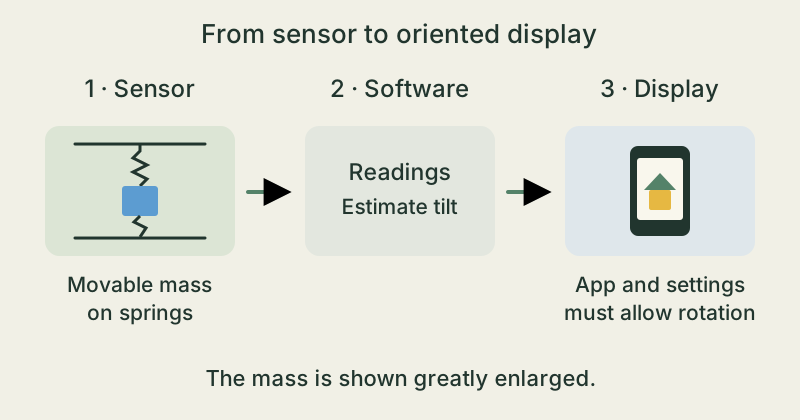
Software interprets the signals
Sudden movements affect the readings too. Software can smooth signals and combine several sensors. An additional gyroscope measures how quickly the device turns. The exact arrangement varies between phones.
Sensing and rotating are separate steps
Detecting a change of orientation does not always rotate the picture. A rotation lock or an app that supports only portrait mode can keep the display fixed. An unchanged picture therefore does not prove that a sensor is broken.
Turn slowly and compare
- Sit at a table with an adult. On a phone you already have, open an app that supports both portrait and landscape, such as a web browser. Together, check that automatic rotation is allowed. Remember the original setting.
- Hold the phone securely in both hands, almost upright in front of you. Slowly turn it sideways by a quarter-turn and pause. Draw the orientation of the casing and the picture. Slowly turn it back.
- If a rotation lock is available, switch it on with the adult and repeat the same movement. Compare, then restore the original setting. You are observing the screen's behaviour; you cannot see the tiny sensor mass itself this way.
Observe while seated over the table and keep a firm hold of the device. Do not shake, throw, drop or open it. No extra app is needed.
The takeaway
Sensors provide clues about a phone's orientation. Software uses them to decide how to display the picture. Automatic rotation works only when the app and settings permit it.
What helps a phone held still detect its tilt?
Sources & further reading
Google · Science Journal Help: Sensors on your device · Accelerometer ↗NASA: Mars Buggy Curiosity Measures a Mountain's Gravity · Accelerometers at rest ↗Android Developers: Motion sensors · Gravity, accelerometer and gyroscope ↗Apple Support: Rotate the screen on your iPhone or iPod touch · App support and rotation lock ↗Our stories explain the main idea in our own words. Pictures and models simplify reality and are not drawn to scale.