
Light travels in straight lines. Light from the top of an object passes through the tiny hole and reaches the bottom of the screen. Light from the bottom lands at the top. That turns the image upside down.
Imagine a dark box with just one tiny hole at the front. On the back wall, you can make out a window, frame and all. But the window is upside down. How did that picture get there?
The hole lets only a few rays through
A brightly lit object sends reflected light in many directions. The wall of the box blocks nearly all of it. From each point on the object, only a narrow bundle of rays can get through the tiny hole.
Without the dark box, extra light would fall on the screen. That would make the faint image harder to see.
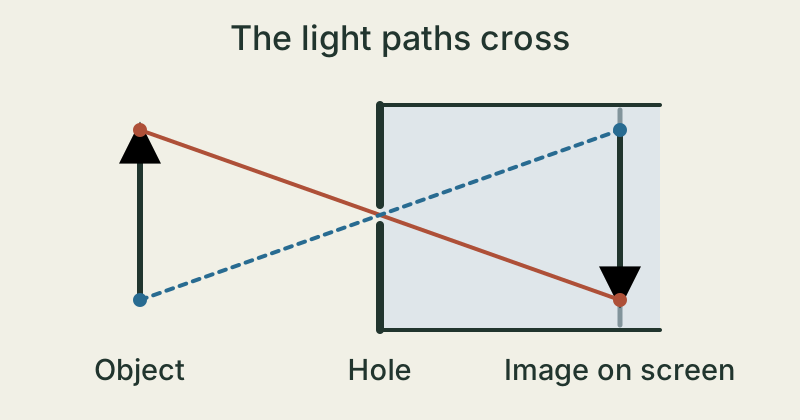
The light paths cross at the hole
Follow a ray from the tip of an arrow pointing up. It travels diagonally down to the hole and keeps going in the same direction. It reaches the lower part of the screen at the back.
A ray from the bottom of the arrow travels diagonally upwards. It reaches the screen farther up. Left and right swap places too, so the image has been turned by half a turn.
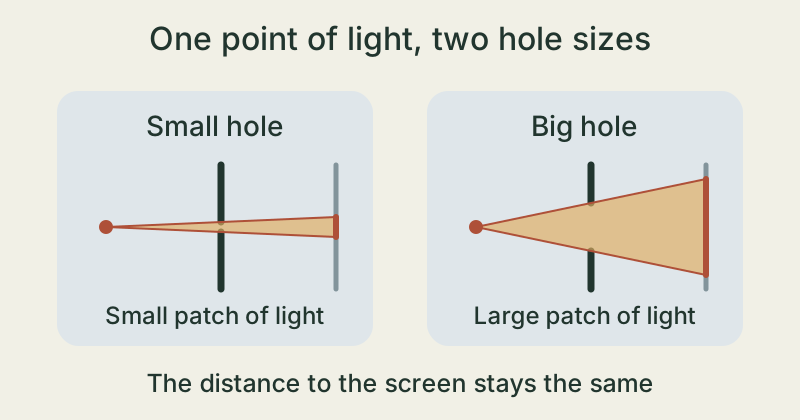
The size of the hole changes the picture
A bigger hole lets in more light. Rays from a single point outside can then fall across a larger patch of the screen. Patches from nearby points overlap more easily, so edges look blurry.
A small hole usually makes the picture clearer but dimmer. When the hole is extremely small, light can spread out more as it passes through. Eventually the picture gets blurrier again.
Watch a window image turn upside down
- Stretch a piece of translucent baking parchment or tracing paper over one end of a cardboard tube and tape it in place. Cover the other end with aluminium foil. Have someone make a single tiny hole in the centre of the foil with a pin.
- Tape a large dark paper arrow pointing up to a bright window that is out of direct sunlight. Point the foil end of the tube towards the arrow. Start about an arm’s length from the window.
- Look at the paper on the back of the tube. Shade it from the room light with your hands and slowly move the tube until you see the arrow. Where does its tip point on your screen?
Ask for help with the pin. Use a shaded window and never point the tube at the Sun.
The takeaway
The tiny hole selects narrow bundles of light. The paths cross at the hole and continue straight, so the image on the screen is turned by half a turn.
Where does light from the top tip of the arrow land on the screen?
Sources & further reading
MIT · Computational Photography: Pinhole image formation and linear perspective ↗University of Arizona · Wyant College of Optical Sciences: Pinhole Camera ↗Exploratorium · Light Rays and Pinholes ↗Our stories explain the main idea in our own words. Pictures and models simplify reality and are not drawn to scale.